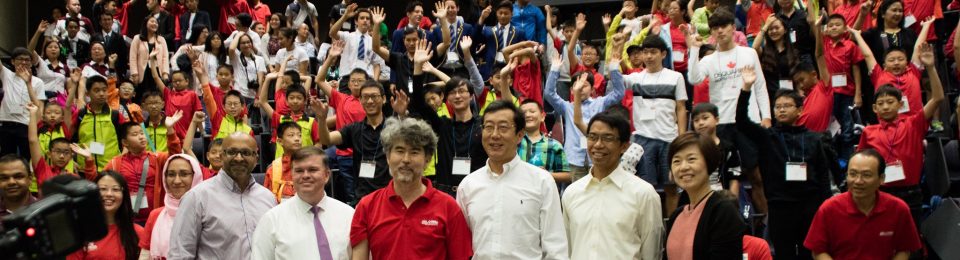
The programming competition, new for 2023, challenges the competitors to programmatically, answer/solve as many questions as they can in the time available, two (2) hours, using the Python language.
The competition is partitioned into two divisions; Junior and Senior. The questions in each division cover a diverse range of problem domains with each question being classified into one of three difficulty groups; Easy, Intermediate, and Challenging according to the division.
Each submitted answer will be evaluated and points will be awarded for correctness, algorithmic efficiency, and quality of code comments. A difficulty modifier will be applied to the resulting score according to the question’s difficulty rating (1,3,5).
Competitors will accumulate points for all the answers they submit, and the competitors will be ranked on a ladder in each division in descending order of total points. The competitor with the most points in each division will be deemed to be the winner of the division, with second (2nd) and third (3rd) places also being recognised.
The competitors will be required to utilise the computers prepared by the competition organisers for the occasion.
Event program:
| Location | G23_2.20 |
| Date | October 28, 2023 |
| Time | 9:30am – 2:00pm |
| Format | |
| 9:30-10:00 | Setup and preparation |
| 10:00 – 12:00 | Competition |
| 12:00 – 12:30 | Lunch |
| 12:30 – 4:00 | Assessment |
| 4 pm – 5:30pm | Award Presentation |
Computer configuration:
| Browsers | Chrome |
| FireFox | |
| Edge | |
| Editors | Notepad++ |
| Visual Studio Code | |
| Sublime Text | |
| Python Versions | Python 3.11.5 |
| Python 3.12 | |
| Python Libraries | The following python libraries should be already installed: NumPyMatplotlibSciPyPandasPlotlyScikit-LearnTkinterBokehTheanoSeabornNote that pip can be used to installany other python libraries that are needed. |
| Python Language | https://docs.python.org |
| Reference Material | https://www.w3schools.com/python/ |
| https://brainstation.io/learn/python/ | |
| https://pypi.org | |
| Artwork | https://www.piskelapp.com (for sprite creation) |
Python Language Reference PDF locally on the computer. | |
Note the docs.python.org site is multilingual:English, Spanish, French, Japanese, Korean, Brazilian Portuguese, Turkish, Simplified Chinese, and Traditional Chinese. |
After logging into the computer, the competitors should look for the Innovative Tech icon on the desktop and double-click it. Within this folder are all the resources needed and allowed to be used. The image below shows the desktop and the contents of the Innovative Tech folder.
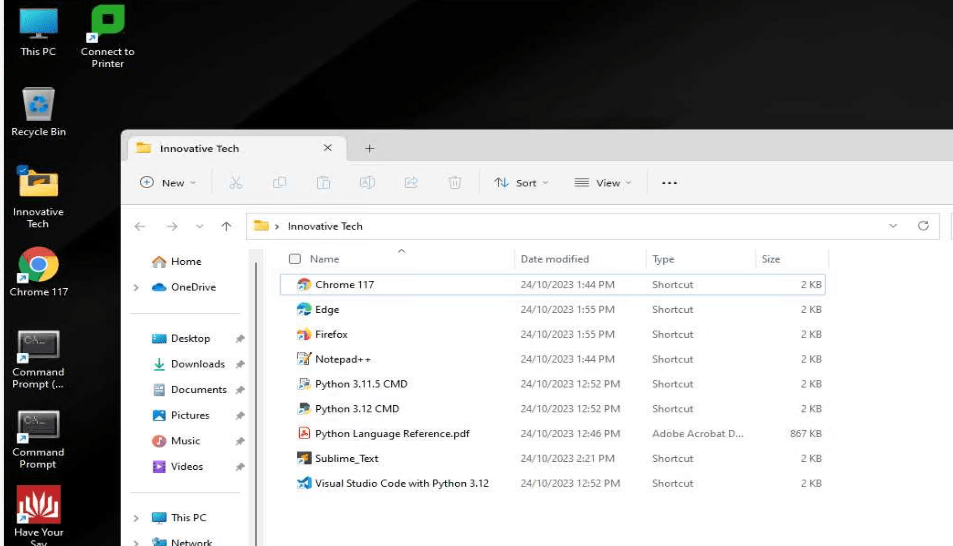
Python 3.11.5 CMD and Python 3.12 CMD are preconfigured command terminals which the competitor can use to run their programs and from which they can capture their results. See below for submission instructions.
The rules of the competition:
- prohibits competitors from accessing any websites other than those shown in the table above,
- prohibits the use of personal USB memory sticks. Only the memory stick given to the competitor by the organisers is allowed to be used during the competition,
- requires competitors to develop all their answers on the day of the competition,
- competitors must follow the instructions of the invigilator,
- allows competitors to be coached by their team-leader on Python language related matters that in no way give the solution to the competitor. The code and algorithms must be developed solely by the competitor themselves. Please consult with the invigilator for specific advice.
- allows competitors to be coached by their team-leader on the wording of the questions to ensure the competitor understands the question. This must be done in such a way as to not disclose the solution. For example, Fibonacci numbers should be explained as the sequence of numbers without disclosing the relationship between entries in the sequence.
Procedure for submitting answers:
The competitor will submit the USB memory stick given to them at the beginning of the competition to the invigilator when they have
- finished answering all the questions they intend to answer, or
- the available time has expired, whichever occurs first.
(The memory stick will be returned to the competitor after the invigilator copies the data from it.)
Make sure to allow sufficient time to copy all materials to the USB before the time expires.
The information on the memory stick should be organised as follows:
- During the Setup time, the competitor will chose an arbitrary 10 digit number and inform the invigilator what their chosen number is.
(The invigilator will make sure no one else chooses the same number.)
(This number will be used as an anonymous identifier for the competition judges.) - The competitor will create a folder at the root level of the memory stick whose folder name is their chosen number.
- Within this folder, the competitor will create sub-folders using the format:
<Division><QuestionNumber>(Do not use spaces between these fields.)
E.g. Junior_Q1 (note that the underscore and ‘Q’ in the example are optional)
- Within each such folder, the competitor will store their program for that question along with any data that was used as input and any output their program generated as part of their answer.
Scores and Scoring:
Each question is assessed for correctness, comments and algorithmic efficiency as follows:
- Up to 4 points for correctness
- Up to 2 points for comments
- Up to 4 points for algorithmic efficiency
The score is then modified according to its difficulty:
- x1 for Easy questions
- x3 for Intermediate questions
- x5 for Challenging questions
The overall score for the competitor is the sum of all the scores for every question they submit.
 Australian Robotics Association